July 7, 2026
At some point, every growing pest control business asks the same question: why does getting bigger feel harder than it should?
More technicians, more recurring routes, more compliance requirements, and somehow more time spent managing the business instead of running it. The problem is rarely effort. More often it is the gap between the tools you have and the workflows your business actually needs. Modern pest control software exists to close that gap between day-to-day operations and systems that scale.
Whether you are coordinating a team of three or scaling toward thirty, this guide gives you a clear framework for evaluating pest control software and a straight answer on which platforms are worth your time. The right choice depends on what is breaking as you grow, not on whoever has the longest feature list.
Key Takeaways
- The right pest control software depends on your growth stage, not just the number of features offered.
- Early-stage teams can manage with basic scheduling and CRM tools, but growing operations need automation for recurring services and customer management.
- Generic tools like Jobber and Housecall Pro are useful starting points, but may not support pest-specific workflows as complexity increases.
- As operations expand, managing recurring treatments, inspections, and chemical compliance becomes difficult without a dedicated system.
- Purpose-built platforms like PestBase are designed to centralize these workflows and improve visibility across teams.
Best Pest Control Software: Find the Right Platform for Your Growth Stage
The best pest control software depends on your business’s growth stage. Small teams need simple scheduling and CRM tools, while growing businesses require automation for recurring services and customer management.
Scaling operations need purpose-built platforms like PestBase that handle chemical inventory tracking, inspections, route optimization, and technician visibility.
Choose software based on what's breaking as you grow and what your business needs, instead of just following feature lists.
The Fit Test: Where Is Your Business Today?
Before comparing tools, it helps to understand whether your current system is actually keeping up with how you operate. Answer these five questions:
- Are you tracking treatments in spreadsheets or notes? This often works early on but gets harder to maintain as customer volume and service frequency rise.
- Do you manually schedule recurring services? Monthly and quarterly visits become difficult to manage without automation.
- Are technicians constantly calling for updates? Frequent check-ins usually signal limited visibility into schedules, job status, or customer history.
- Do you lack visibility into chemical usage? As compliance and reporting needs grow, manual tracking leads to gaps and inconsistencies.
- Is growth creating more problems instead of efficiency? When adding customers or technicians increases confusion rather than output, that is usually a system limitation.
If you see a pattern across these questions, your current setup may no longer match your stage of growth. The next step is understanding what changes as a pest control business moves from early operations to structured, scalable systems.
The Pest Control Operations Maturity Model
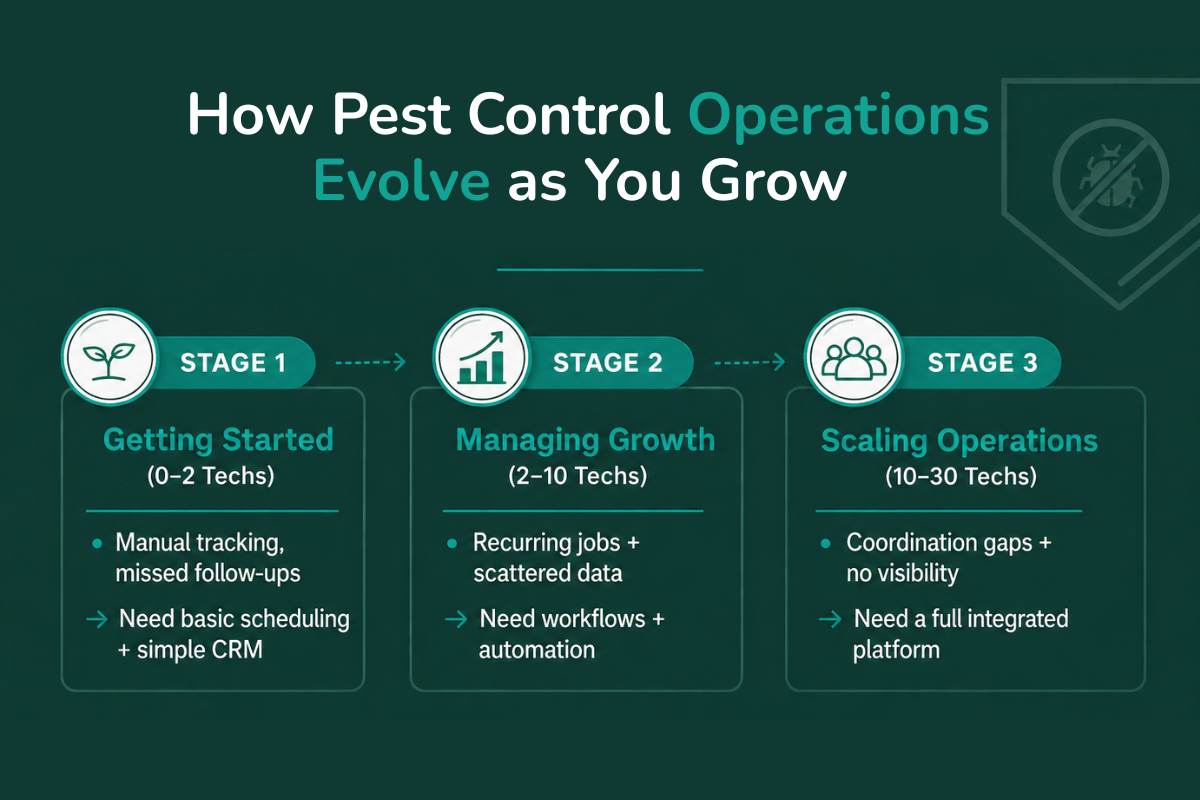
As pest control businesses grow, the problem is not just more work. It is that the same way of working stops holding up. What feels manageable early on starts creating gaps, delays, and missing visibility as operations expand.
Stage 1: Getting started (0 to 2 techs)
What is breaking: jobs, notes, and customer details live across notebooks, spreadsheets, or messaging threads, and repeat visits or callbacks depend on memory and manual reminders.
What you need: basic scheduling to track jobs and appointments in one place, and a simple CRM to store customer details and service history, with a clear plan for when to upgrade to a dedicated pest control CRM.
Stage 2: Managing growth (2 to 10 techs)
What is breaking: monthly and quarterly treatments require constant manual scheduling, and customer data splits across tools, making it harder to track history, preferences, and past treatments.
What you need: structured workflows to standardize how jobs are scheduled and completed, and automation for recurring services, reminders, and follow-ups.
Stage 3: Scaling operations (10 to 30 techs)
What is breaking: adding technicians increases coordination complexity without improving efficiency, and it becomes difficult to track performance, chemical usage, and service outcomes across the business.
What you need: a full platform that connects scheduling, service history, inspections, and reporting, plus centralized visibility across technicians, jobs, and operations, which typically only comes from a purpose-built system like PestBase.
As you move between stages, the requirements do not just increase; they change. A basic tool that works early will not support recurring services, compliance, or team visibility at scale.
What Pest Control Software Must Do
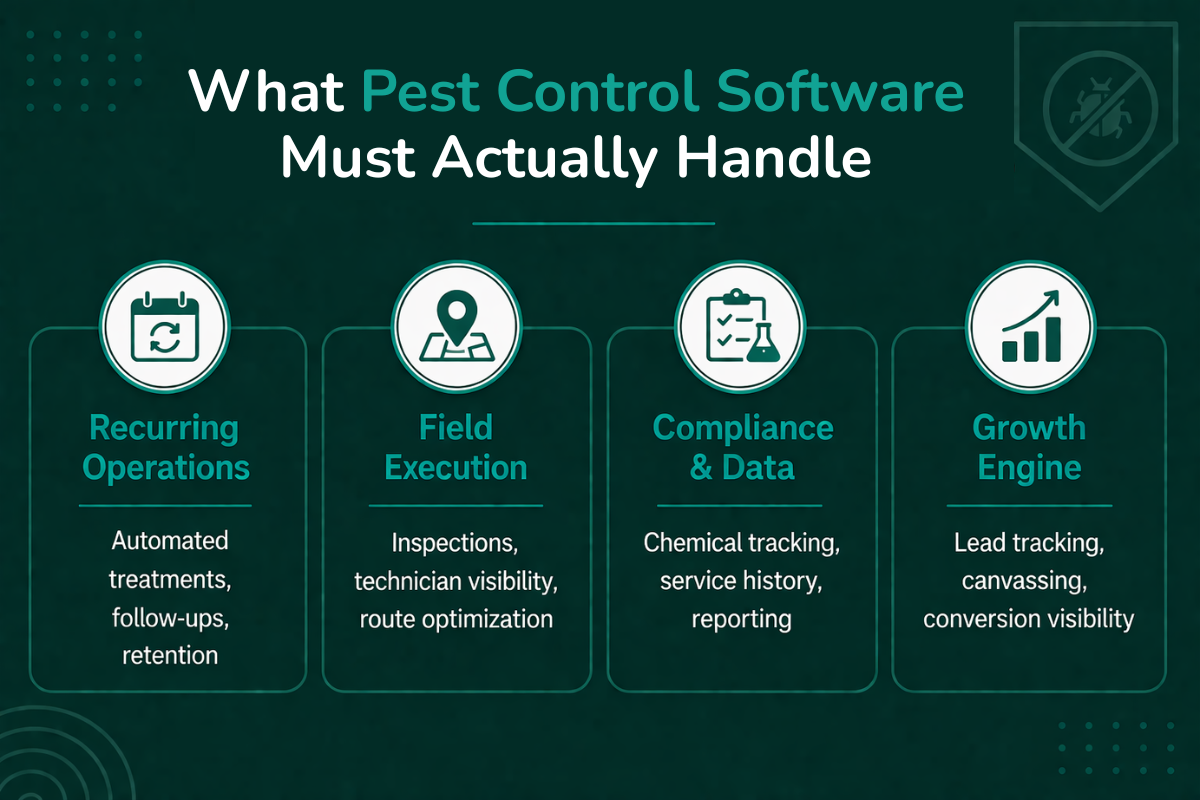
At each stage, software should remove the specific operational friction you are facing right now. Here is what that looks like in practice.
1. Handle recurring treatments automatically. Recurring services are the core of most pest control businesses, and managing them by hand quickly becomes unreliable. Without automation, schedules drift, visits get missed, and technicians rely on constant coordination. This becomes critical as soon as you move past a handful of customers.
2. Track chemical usage and compliance. As operations grow, chemical and inventory tracking is required for safety, reporting, and regulatory compliance, including FIFRA pesticide application records that many states audit. Manual logs make it hard to keep accurate records or produce reports on demand. This matters more with every technician you add.
3. Support pest-specific inspection workflows. Pest control is not just job completion. It involves inspections, findings, and property-level tracking that generic tools capture poorly, which leads to incomplete records and inconsistent reporting. This becomes necessary once you handle varied service types and multiple properties.
4. Provide real-time technician visibility. As your team grows, knowing where technicians are, what they are working on, and each job's status becomes essential. Without it, teams fall back on calls and messages to coordinate.
5. Centralize customer history and service logs. Interactions, treatments, and service history often scatter across tools. A centralized CRM view ensures technicians and office staff can access complete, accurate information at any time.
6. Optimize routes and scheduling. Manual scheduling works early on, but inefficient routing wastes time and fuel and reduces jobs completed per day. Smart routing maximizes technician productivity without adding workload, and becomes a clear bottleneck as volume rises.
7. Automate follow-ups and retention. Retention in pest control depends on timely follow-ups and reminders. Automation keeps customers re-engaged without manual effort, which directly affects repeat business as you scale.
8. Enable door-to-door canvassing and lead tracking. For teams that rely on field sales, tracking leads, follow-ups, and conversions is critical. Without a system, leads get lost, and performance is hard to measure, which is why canvassing and lead tracking matter for growth-focused teams.
As these needs stack up, the gap between generic tools and purpose-built platforms becomes clearer. Systems like PestBase are designed to bring these workflows together rather than forcing teams to manage them across multiple tools.
Feature Checklist: What to Look for Before You Buy
Use this checklist to evaluate whether a platform supports the workflows your business actually needs.
| Feature | Why it matters | Priority |
|---|---|---|
| Recurring services | Ensures treatments happen on schedule without manual tracking | Must-have |
| Chemical tracking | Supports compliance, reporting, and safety requirements | Must-have |
| Inspection forms | Captures property-level data and service details consistently | Must-have |
| Scheduling | Organizes jobs, technicians, and availability | Must-have |
| CRM | Centralizes customer history and service records | Must-have |
| Reporting | Provides visibility into operations and performance | Must-have |
| Automation | Reduces manual effort across scheduling and follow-ups | High value |
| D2D tools | Tracks leads and conversions from field sales | High value |
Best Pest Control Software by Business Stage
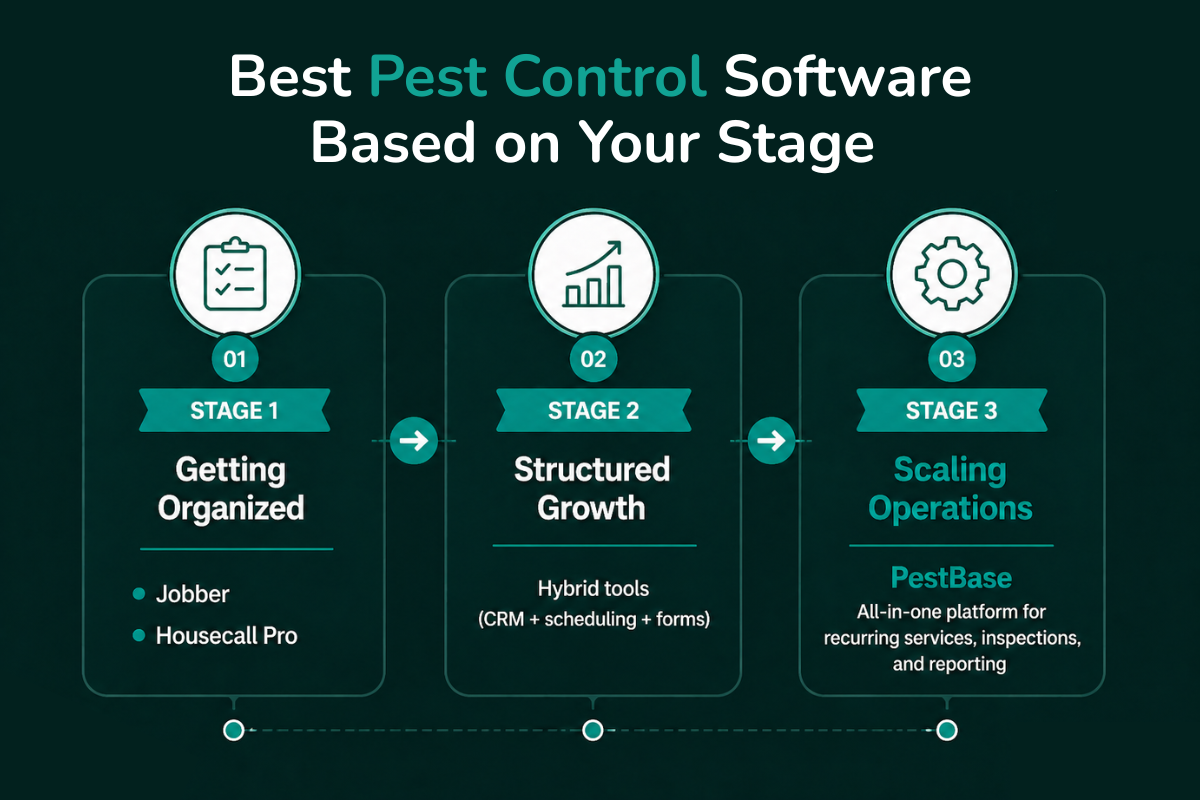
The best choice depends on where your business is today. A two-technician team does not need the same system as a 30-technician operation managing recurring services, chemical logs, inspections, routing, and reporting. Confirm current pricing with each vendor before deciding, since plans change often.
Stage 1: Getting organized
Jobber. A general field service platform used by small service businesses, including pest control teams, to manage scheduling, dispatching, job details, chemical usage, and payments in one place.
- Key features: scheduling and dispatch, customer management, quotes and invoices and payments, job details and chemical usage tracking, and QuickBooks Online integration.
- Strengths: a strong fit for small pest control businesses moving off paper, spreadsheets, and manual scheduling, especially when the goal is simply to organize jobs, customers, and payments.
- Limitations: because it serves many home service industries, it may not go deep enough for advanced inspection workflows, compliance tracking, recurring treatment automation, or field sales at scale.
- Pricing: starts around $39 per month for the Core plan, with higher team tiers available; pricing varies by plan and billing cycle.
Housecall Pro. Another general field service platform for home service businesses, positioned around CRM, scheduling, technician routing, and payments.
- Key features: online booking and scheduling, dispatching and routing, invoicing and payments, customer communication, and reporting.
- Strengths: works well for small teams that want a user-friendly system for scheduling, communication, and payment collection without building a complex tech stack.
- Limitations: like Jobber, it is not pest-specific by default, so growing teams may eventually need stronger tools for recurring services, chemical records, inspections, and compliance.
- Pricing: starts around $59 per month for the Basic plan, with Essentials and higher tiers costing more and the top tier quoted custom.
Stage 2: Structured growth
At this stage, many businesses stitch together general field service software, CRM tools, spreadsheets, forms, and manual follow-up. This can work temporarily for teams that are growing but not yet ready for a full pest control platform.
- What to look for: recurring job scheduling, CRM and customer history, basic route planning, forms or inspection templates, payment collection, and simple reporting.
- Strengths: a hybrid setup can add structure without a major software transition, which helps when the business needs better organization but is still refining workflows.
- The main risk: fragmentation. When customer history lives in one tool, inspection notes in another, chemical logs in spreadsheets, and follow-ups in someone's inbox, it gets harder to scale cleanly. This is often the point where adopting a pest-specific platform early saves a painful migration later.
Stage 3: Scaling pest control businesses
PestBase. A platform built specifically for pest control businesses, covering workflows from lead capture and CRM through scheduling, inspection, inventory, proposals and approvals, invoicing and payments, follow-ups, and marketing.
- Key features: lead capture and CRM, scheduling and dispatch, a technician mobile app, inspection workflows, proposals and approvals, invoicing and payments, follow-up and marketing tools, and door-to-door canvassing and lead tracking.
- Strengths: best suited for growing businesses that want to reduce tool-switching and manage operations in one system. Its biggest advantage is that it is built around pest workflows, including FIFRA-related compliance, rather than generic field service needs. PestBase reports serving more than 50 pest control businesses, with customers citing roughly 10 hours saved each week on admin work and a 4.8-star average rating.
- Limitations: as a newer platform, public third-party review data is more limited than older tools like FieldRoutes or ServiceTitan, so it is worth evaluating through a demo and a workflow-fit check.
- Pricing: custom, based on team size and requirements. Book a demo for specifics.
Other platforms to consider
FieldRoutes. An established pest control and field service platform supporting routing, scheduling, billing, customer management, pest activity tracking, and pesticide usage tracking.
- Strengths: a strong option for businesses that want an industry-specific platform with pest-related functionality.
- Limitations: some users find it expensive or not fully transparent on pricing, and reviews occasionally flag reporting and support. Capterra lists it around 4.2 stars, with users praising ease of use and training while some want stronger reporting.
- Pricing: quote-based, priced by active customer count rather than per technician, and independent listings put the entry point around $350 per month plus a one-time implementation fee, with no free trial.
ServiceTitan. An enterprise-grade field service platform used across home service industries, including pest control, positioned around dispatching, invoicing, reporting, customer history, and operational efficiency.
- Strengths: best for larger or more complex businesses that need strong reporting, multi-team visibility, and advanced operational controls.
- Limitations: it can be too complex or expensive for smaller pest control companies, and reviewers frequently note a steep learning curve alongside the comprehensive feature set. Software Advice lists it around 4.4 out of 5.
- Pricing: quote-based per-technician pricing that independent analyses commonly place in the low hundreds of dollars per technician per month, with onboarding fees usually separate.
Software comparison
| Software | Best for | Ease of use | Pest-specific | Scalability |
|---|---|---|---|---|
| PestBase | Growth-stage pest (10 to 30 techs) | High | High | High |
| Jobber | Small teams (0 to 5 techs) | High | Low | Medium |
| Housecall Pro | Small to mid-size teams | High | Low | Medium |
| FieldRoutes | Pest-specific SMBs | Medium | High | High |
| ServiceTitan | Enterprise operations | Medium | Medium | Very high |
General field service tools like Jobber and Housecall Pro are easier to adopt early, while pest-specific platforms like PestBase and FieldRoutes become more relevant as workflows grow more complex.
Implementation and Adoption: Why Software Fails After Purchase
Choosing the right software is only part of the decision. For many businesses, the harder challenge is getting the system to work in day-to-day operations. Three things typically break down.
Low team adoption. Even well-designed tools fail if technicians and office staff do not use them consistently. When software feels complex or slows routine tasks, teams fall back to calls, notes, and old workflows, creating gaps in data and visibility.
Long setup times. Some platforms require extensive configuration, data import, and training before they become usable. That delays time-to-value, and in many cases businesses never fully transition, continuing to rely on partial or parallel systems.
Workflow mismatch. Not all field service software is built for pest control. When a tool does not properly support recurring treatments, inspections, or compliance tracking, teams build workarounds with spreadsheets and manual logs, which recreates the exact problems the software was meant to solve.
This is where purpose-built platforms tend to stand out, with workflows designed around real pest operations and faster time-to-value.
PestBase Deep Dive: Built for Pest Control, Not General Service
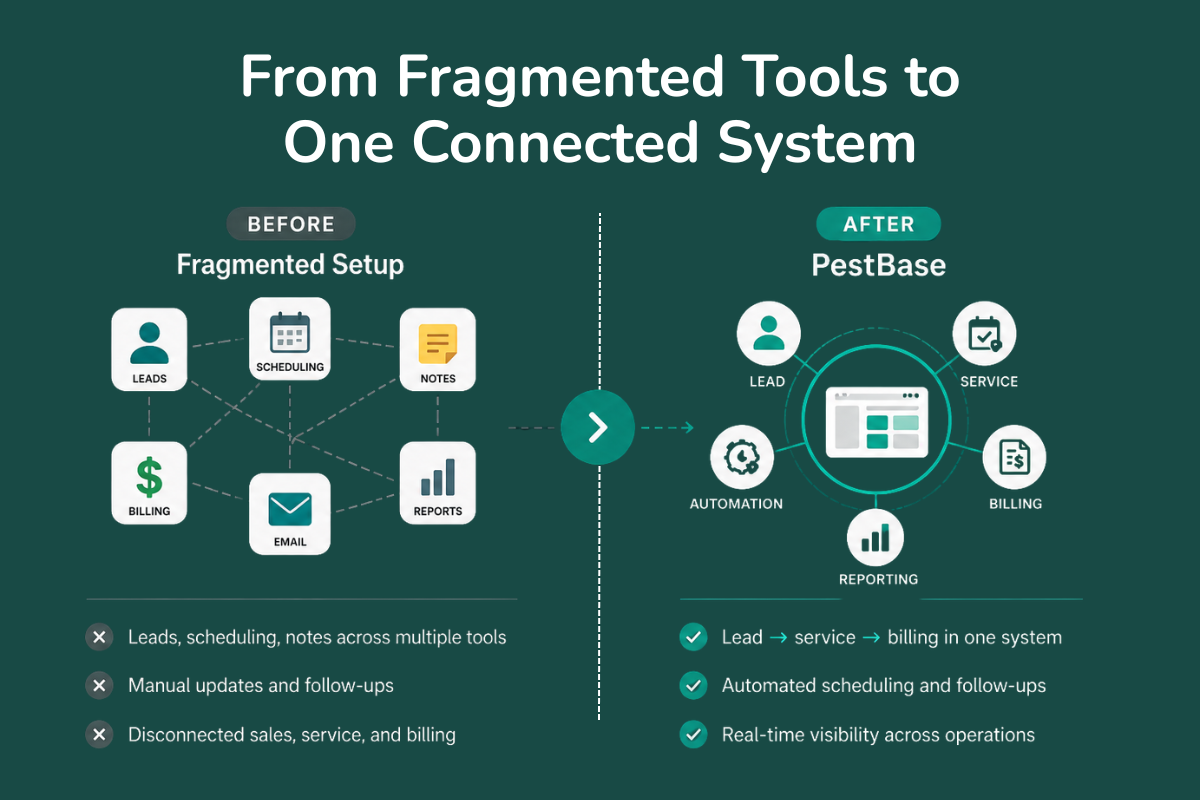
As businesses move into Stage 3, the challenge is not just managing jobs. It is connecting sales, operations, technicians, and compliance into one system. This is where PestBase positions itself differently from general field service tools.
Designed around pest workflows. PestBase is structured around how pest control businesses actually operate, from lead capture and canvassing through proposals and approvals, scheduling and dispatch, technician job execution, and invoicing and follow-ups. Data flows from sales to service to billing without re-entry.
Eliminates workarounds. Instead of juggling a CRM, spreadsheets, inspection notes, and messaging apps, PestBase combines CRM and customer history, scheduling and routing, a technician mobile app, inventory and chemical tracking, and invoicing and payments in one system, which removes tool-switching and duplicate data entry.
Faster time-to-value. Complexity is a common barrier to adoption. With drag-and-drop scheduling, mobile access for technicians, automated reminders and follow-ups, and real-time job and team visibility, PestBase reduces setup friction so teams can start without long onboarding cycles. Customers report cutting weekly admin time and reducing churn meaningfully after switching.
A typical workflow. A lead comes in through a website form or a door-to-door rep. The system assigns it and schedules a visit. The technician receives job details on the mobile app. Service is completed with notes, photos, and updates logged in real time. An invoice is generated, and payment is collected. Follow-ups trigger automatically. Instead of managing each step separately, the whole flow runs in one system, from first contact to repeat service.
Final Decision Framework: Choose Based on Your Next Stage
The right decision is not about the best tool overall. It is about what supports your next stage of growth without overcomplicating your current operations.
If you are just starting, the goal is to get organized, not to implement a complex system. You need basic scheduling, a simple CRM, and invoicing and payment collection. Tools like Jobber or Housecall Pro are usually enough to replace paper and spreadsheets. Avoid over-investing in advanced platforms you will not fully use yet.
If you are growing fast, this is where friction appears. Recurring services, follow-ups, and customer data get harder to manage manually. You need automation for recurring treatments, structured workflows for jobs and follow-ups, and better visibility across technicians and customers. Many teams run a mix of tools at this point, which is also where fragmented systems start slowing things down. If your team spends more time managing tools than managing jobs, your setup is not scaling.
If you are scaling operations, the focus shifts from managing work to running a system that supports growth. You need a centralized platform for scheduling, inspections, and customer history, reporting and visibility across jobs and teams, and workflows that connect sales, service, and follow-ups. This is where a purpose-built platform like PestBase becomes relevant, since it handles pest-specific operations without relying on multiple tools.
Choosing for your current needs matters, but choosing for what your business will need next is what prevents another system change a year from now.
If you are already dealing with recurring services, technician coordination, or scattered customer data, the difference between managing work and running a system becomes clear quickly. Book a demo and walk through your actual workflow rather than a generic product tour.
Frequently Asked Questions
What is the best pest control software for small businesses?
For small teams, the best option covers scheduling, customer tracking, and invoicing without adding unnecessary complexity. Tools like Jobber or Housecall Pro are often enough to replace manual systems early on.
When should a pest control business switch to specialized software?
Consider switching when recurring services, inspections, and compliance tracking become difficult to manage manually. That is usually when growth starts creating operational gaps instead of efficiency.
How is pest control software different from general field service software?
Pest control software is designed to handle recurring treatments, inspection workflows, and chemical and FIFRA compliance tracking, which most general field service platforms do not fully support.
What features should I look for in pest control tools?
Prioritize recurring scheduling, inspection forms, chemical tracking, route optimization, and centralized customer history to support day-to-day operations.
Can pest control software integrate with accounting software?
Yes. Many platforms integrate with accounting tools like QuickBooks to streamline invoicing, payments, and financial tracking, reducing manual data entry across systems.
Do pest control businesses need marketing and retention features?
As competition increases, many businesses combine automated follow-ups with email and direct mail to generate leads and retain customers, especially in local service areas where retention drives most revenue.